That domain renewal notice in the mail is probably a scam: how to check in two minutes
Official-looking letters and emails warning that your domain is about to expire are usually an attempt to move your domain or take your card number. The red flags, the two-minute check that settles it, what to do if you already paid, and the settings that make you a hard target.
Just want the fix?
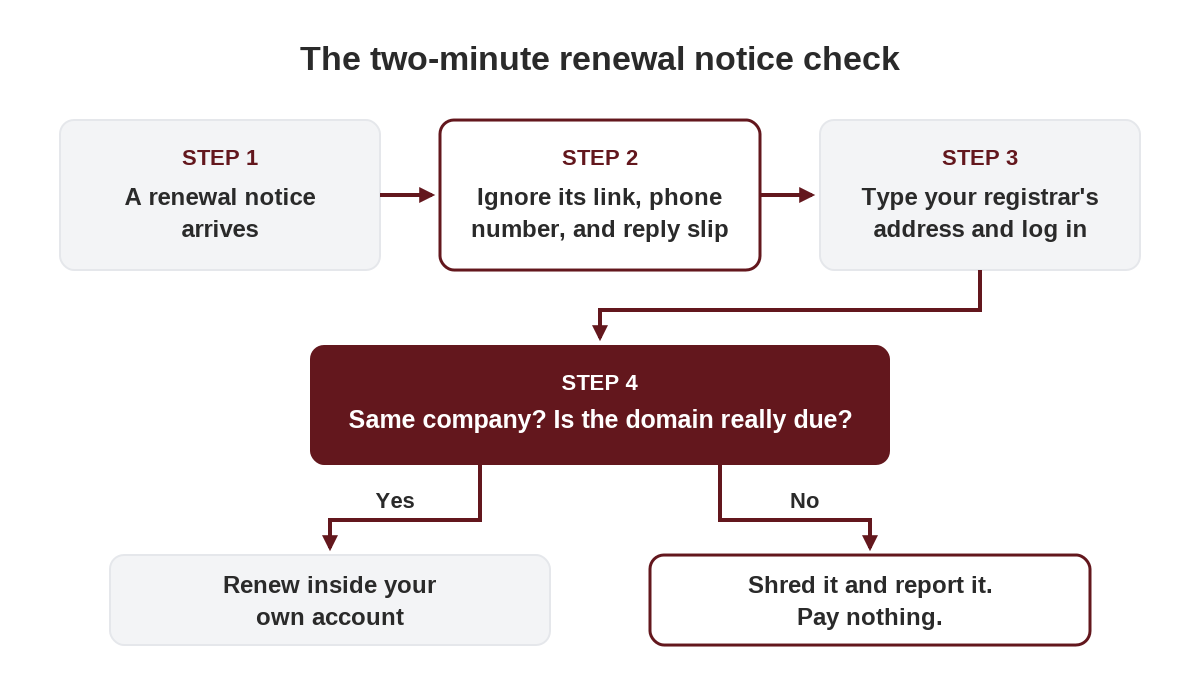
Got a letter or email saying your domain is about to expire? Do not use anything in it. Log in to your registrar by typing its address yourself and check the expiry date. If the domain is due, renew it there. If the notice came from anyone else, it is a solicitation or a scam: pay nothing, and report it.
Sooner or later, every small business with a website gets the letter. It arrives in a plain envelope, it has your business name and your domain printed on it, and it says something urgent like "Domain Name Expiration Notice." There is a price, a deadline, and a tear-off slip to mail back with a check. It looks official. It is almost always a scam.
The same trick now arrives by email too, sometimes dressed up with the logo of the organization that oversees domain names. This post covers how to tell the fake notices from the real ones, the two-minute check that settles it every time, and the few settings that make you nearly immune.
What the fake notice is actually selling#
Most of these letters are not trying to renew your domain. They are trying to move it.
Your domain lives at a company called a registrar (Namecheap, GoDaddy, Cloudflare, Squarespace, and so on). The fake notice is written so that paying it quietly authorizes a different company to take over the registration, usually at a much higher yearly price. The industry calls this "domain slamming." The fine print often admits, in small type, that the letter is a solicitation and not a bill. The big type is designed so you never read the small type.
The email version is cruder. It links to a polished checkout page that exists only to collect your card number and personal details. Pay it and your domain renews nowhere; you have simply handed your card to a stranger.
Either way, the cost is not just the money. A domain moved to an unfamiliar company is a domain you may struggle to control, and your domain runs both your website and your email. If you are fuzzy on how those pieces connect, our plain-English explainer on domains and DNS is a good ten-minute read.
The red flags, in order of how often they show up#
- It came on paper. Real registrars renew domains through your account and send reminders by email. A mailed "expiration notice" from a company you do not recognize is one of the most reliable signs of a fake.
- The company name is not your registrar. Many of these outfits use names that sound like a government office or an official registry. Your registrar is the company you actually pay. If the name on the letter is not that company, it is not your renewal.
- The price is strangely high. A normal .com renews for a modest yearly fee at a mainstream registrar. Slamming letters often charge a multiple of what you usually pay, sometimes bundled with a "search engine listing" you never asked for.
- The deadline is wrong or vague. The notice may warn of expiration when your domain actually has months, or years, left. The urgency is the point; it is meant to make you pay before you check.
- It claims to come from the organization that runs domain names. ICANN, the nonprofit that coordinates the domain name system, has publicly warned about fake renewal emails that copy its logo. ICANN says it does not process domain registrations or collect fees from domain owners; its warning explains that all fees are handled between you and your registrar. Any email "from ICANN" asking you to pay a renewal is fake by definition.
- The email link goes somewhere odd. Hover over (or long-press, on a phone) the "Renew now" button before you tap it. If the address it points to is not your registrar's real website, close the email.
The two-minute check that settles it#
You do not need to become an expert in spotting fakes. You only need one habit: never act on the notice itself. Do not call the number on it, do not scan its QR code, do not click its link. Go to the source instead.
- Open a browser and type your registrar's address yourself, or use a bookmark you saved. Log in to your account.
- Find your domain in the account and look at the expiration date and the renewal price. That is the truth. If the domain is not due, the notice was fake. If it is due, renew it right there, inside your own account.
- If you cannot remember who your registrar is, look up your domain with ICANN's free registration data lookup tool. It shows the registrar's name and the expiration date. (You may see your own name hidden behind a privacy service. That is normal and a good thing.)
That is it. A roofer in Mount Pleasant and a dental office in Goose Creek can both do this in less time than it takes to read the fake letter's fine print.
What to do if you already paid#
It happens to careful people too, because the letters are designed to catch you on a busy day. If you mailed a check or entered a card:
- Call your bank or card company right away and tell them the charge came from a deceptive solicitation. Ask what your options are for stopping or disputing it. The sooner you call, the more options you are likely to have.
- Log in to your real registrar and check that your domain is still there. Then turn on transfer lock (more on that below) so nobody can move it without your say-so.
- If the domain has already been moved, contact your original registrar's support team and explain what happened. Domain transfers have a formal process, and registrars deal with disputed transfers regularly.
- If you entered a card number on a fake website, treat that card as compromised. Change the password on any account that used the same password, starting with your email and your registrar.
- Report it. The Federal Trade Commission takes scam reports at ReportFraud.ftc.gov, including impersonation of trusted businesses, and you can file even if you did not lose money. Suspicious emails pretending to be from ICANN can be reported to ICANN as well.
None of this is legal or financial advice, and your bank is the right first call for anything involving money.
Make yourself a hard target#
The best defense is a domain setup so tidy that a fake letter has nothing to grab onto. These take about fifteen minutes, once:
- Know exactly where your domain lives. Write down the registrar's name and keep the login in your password manager. If a former web designer or employee registered it under their own account, get it moved into an account you own. The domain is the one asset that must always be yours, a point we make in the builder versus custom website post too.
- Turn on auto-renew with a card that will not expire soon. Then a renewal letter is easy to judge, because you already know the answer: your domain renews itself.
- Turn on transfer lock (often called "registrar lock" or "domain lock"). Many registrars turn it on by default, but check. It blocks anyone from moving your domain to another company until you unlock it yourself.
- Turn on two-factor login for your registrar account, so a stolen password alone is not enough.
- Use an email address you check as the contact on the account. Real renewal reminders go there, and a business that misses its genuine reminders is a business that eventually loses its domain for real.
- Tell whoever opens the mail. If a bookkeeper or office manager pays your bills, show them this post. These letters are built to look like an invoice, so they often land on the desk of whoever pays the bills, not the owner.
If you set up your site with the twenty dollar website setup, you already registered the domain in your own account with auto-renew on. You are most of the way there; add transfer lock and two-factor and you are done.
The same trick in other costumes#
Once you know the pattern, you will start seeing it everywhere. Unsolicited "search engine registration" invoices. Calls claiming your Google listing is about to be suspended unless you pay. Emails warning that someone in another country wants to register your business name and you must buy the matching domains first. A shop owner in Beaufort can get all three in the same month.
The pattern is always the same: urgency, an official-sounding name, and a payment that has to happen through their link, their number, or their envelope. The answer is always the same too. Ignore the message, go to the real source yourself, and check. Our local SEO guide covers why those "guaranteed ranking" calls deserve the delete key as well.
The short version#
Your domain renews inside your registrar account, not through a letter. Know who your registrar is, turn on auto-renew, transfer lock, and two-factor login, and shred anything that asks you to pay somewhere else.
If you are not sure who controls your domain, or you suspect a former vendor still holds the keys, that is a quick and very common fix. Send me a note through the contact form and I will help you sort out where it lives and get it into your own hands.

Want the next post as it ships? Subscribe to the RSS feed.